📘 Facebook Integration
Automated lead generation and social media integration system for real estate CRM administration
📋 Overview
The Facebook Integration section is a powerful social media connectivity system specifically designed for administrative departments and real estate company managers to establish automated lead generation pipelines from Facebook advertising campaigns. This comprehensive integration system connects Facebook Lead Forms directly to your CRM platform, ensuring seamless lead capture and immediate distribution.
When you access the Facebook Integration section, you'll find a comprehensive table displaying all active Facebook integrations. The system automatically connects Facebook Lead Forms directly to your CRM, ensuring that every lead generated from Facebook advertising is immediately imported into the system and distributed automatically based on your configured settings and rotation management.
🔗 Automated Integration System
The Facebook Integration system provides seamless connectivity between Facebook Lead Ads and your CRM platform, creating an automated lead capture and distribution pipeline that maximizes conversion opportunities and streamlines lead management processes.
🎯 Integration Benefits
📥 Automated Lead Capture
Direct Connection: Facebook Lead Forms connect directly to your CRM system, ensuring every lead generated from advertising campaigns is automatically captured without manual intervention.
⚡ Immediate Distribution
Instant Processing: Leads are immediately distributed to sales teams based on your configured rotation settings, ensuring rapid response times and maximum conversion potential.
📊 Campaign Tracking
Source Attribution: Each lead is automatically tagged with source information, enabling precise campaign performance tracking and ROI analysis for advertising optimization.
🔧 Integration Management
📋 Integration Overview Table
The Facebook Integration section displays a comprehensive table containing all active Facebook integrations, showing connected pages, forms, lead sources, and integration status for complete administrative oversight and management control.
🎯 Management Control: Monitor all Facebook integrations from a centralized dashboard with complete visibility into lead generation performance and system connectivity.
🔗 Complete Integration Setup Process
Follow this comprehensive step-by-step guide to establish a complete Facebook Lead Form integration with your CRM system, ensuring automated lead capture and seamless distribution to your sales teams.
1️⃣ Initiate New Integration
🚀 Starting the Integration Process
To create a new Facebook Lead Form integration, click the "ADD NEW FACEBOOK INTEGRATION" button. This will initiate the connection process between your CRM system and Facebook advertising platform.
Facebook Integration Dashboard - Initial View
2️⃣ Facebook Account Authentication
⚠️ Important Integration Notice
Caution: When you login and save integration with the same page, the same form and different questions of old integration; the old integration will be updated. This ensures you maintain current lead form configurations without duplication.
📘 Facebook Login Process
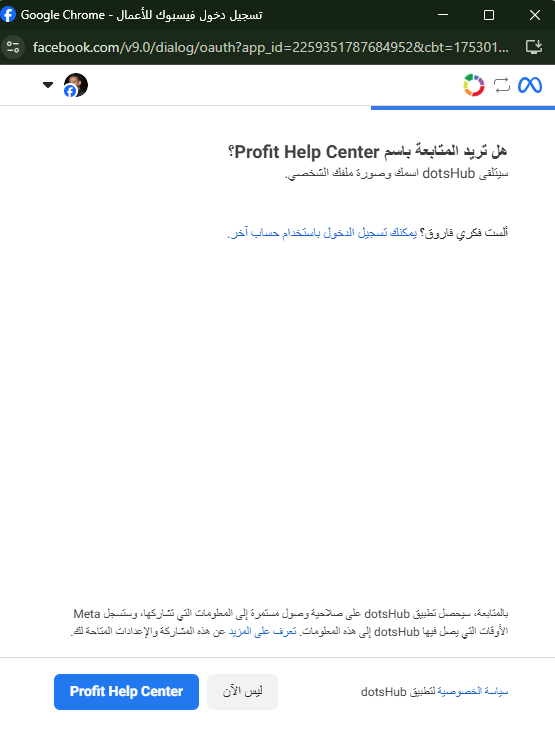
The system will display "Please Log in your Facebook account". Click "LOGIN WITH FACEBOOK" to proceed with authentication. This opens your browser for secure Facebook login and authorization.
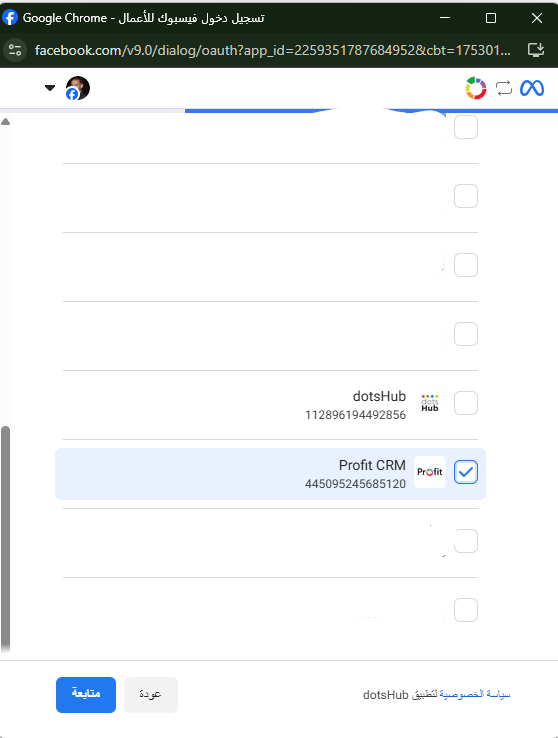
Facebook Page Selection - Choose Your Business Page
3️⃣ DotsHub Access Authorization
🔐 Authorization Process
After selecting your Facebook page, Facebook will display the data and permissions that the integration will access from your page. Review the access request carefully and confirm the connection by clicking "Save" to authorize the integration.
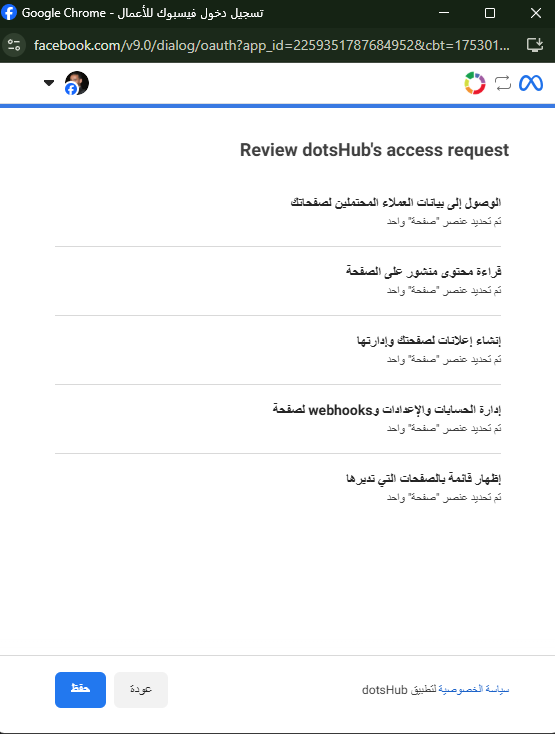
DotsHub Access Request - Review and Confirm Permissions
Success Confirmation: You will receive a confirmation message: "Connected '[Your Account Name]' to dotsHub Application". Click "Done" to complete the authorization process and return to the Profit CRM system.
4️⃣ CRM System Configuration
📄 Page and Form Selection
Back in Profit CRM, you'll find "Select Page" dropdown. Choose the Facebook page from which you want to capture leads and data. After selecting the page, the system will display all available lead forms from your advertising campaigns on that page.

CRM Page Selection - Configure Your Facebook Page Connection
🔗 Lead Link ID Configuration
Configure the "Select AppLink" section to choose the appropriate LEAD Link ID. This enables precise tracking of lead sources and ensures you know exactly which advertising campaign generated each lead. Refer to the LEAD Link ID section for detailed setup instructions.
🔧 Field Mapping Configuration
Configure precise field mapping between Facebook Lead Form fields and your CRM system to ensure accurate data capture and proper lead information organization within your database.
📊 Field Mapping Process
🎯 Data Field Configuration
Configure how Facebook Lead Form fields correspond to your CRM database fields. This ensures that lead information is correctly organized and accessible within your system for optimal lead management and follow-up processes.
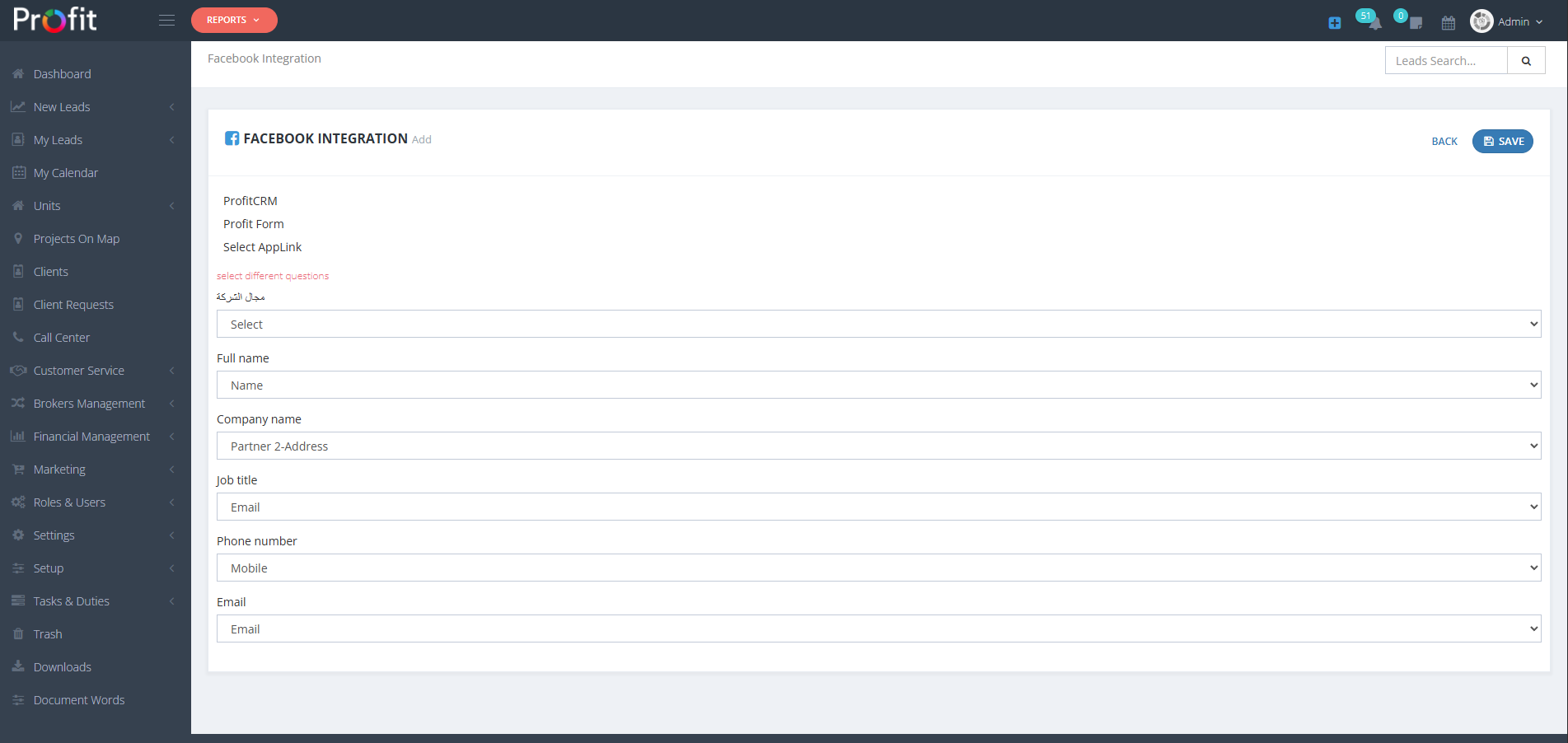
CRM Form Fields Configuration - Map Facebook Fields to CRM Database
📋 Field Mapping Examples
👤 Contact Information
- Name → Map to CRM Name field
- Phone number → Map to Mobile field
- Email → Map to Email field
🏢 Business Information
- Company name → Map to Company Name field
💾 Save Configuration
After configuring all field mappings to ensure the system knows where to place each piece of lead information, click "SAVE" to complete the Facebook Integration setup and activate automated lead capture from your Facebook advertising campaigns.
💡 Business Integration Benefits
⚡ Instant Lead Processing
Eliminate manual data entry and processing delays. Leads flow automatically from Facebook campaigns directly into your CRM system with immediate distribution to sales teams for rapid follow-up.
📊 Campaign Performance Tracking
Track the effectiveness of individual Facebook campaigns with precise source attribution, enabling data-driven advertising optimization and improved ROI measurement.
🎯 Enhanced Conversion Rates
Reduce lead response time through automated distribution and immediate notification systems, significantly improving conversion rates and customer engagement quality.
⚠️ Administrator Integration Notice
Critical Facebook Integration Warning: Facebook integrations require proper Facebook Business Manager setup and appropriate permissions. Ensure your Facebook advertising account has proper access rights, maintain compliance with Facebook's lead generation policies, and regularly monitor integration performance. Test field mappings thoroughly before launching campaigns to ensure accurate lead data capture. This integration directly affects lead generation ROI and sales team productivity.